
This post was entirely written by a human, with no assistance from LLMs or other "AI" technology such as pervert glasses or autonomous weapon systems. The photo is Laughing Arab woman with curly hairstyle using phone and headphones in front of on orange wall by Javier Sanchez Mingorance.
When last we left our REPL in Scittlecastr: All You Need is Persistence, built a nice podcast player interactively, then created a persistence mechanism so we can safely reload the page, and felt good about ourselves for roughly 2.5 seconds before our fingers got itchy to implement some new features.
But first, enjoy the

Alright, let's get going!
First among those features shall be the ability to actually set the playback speed by clicking the playback speed button, which at the moment simply taunts us in the browser console when we click it:
Handling click on                                                  nrepl.cljs:10
  ‣ <button aria-label="Playback speed" id="button-speed" class="cljcastr playback-button">…</button>
  ‣ PointerEvent {isTrusted: true, pointerId: 1, width: 1, height: 1, pressure: 0, …}
No event handler function defined
>
Bummer!
Let's start by stealing taking some inspiration from the Overcast web
player:
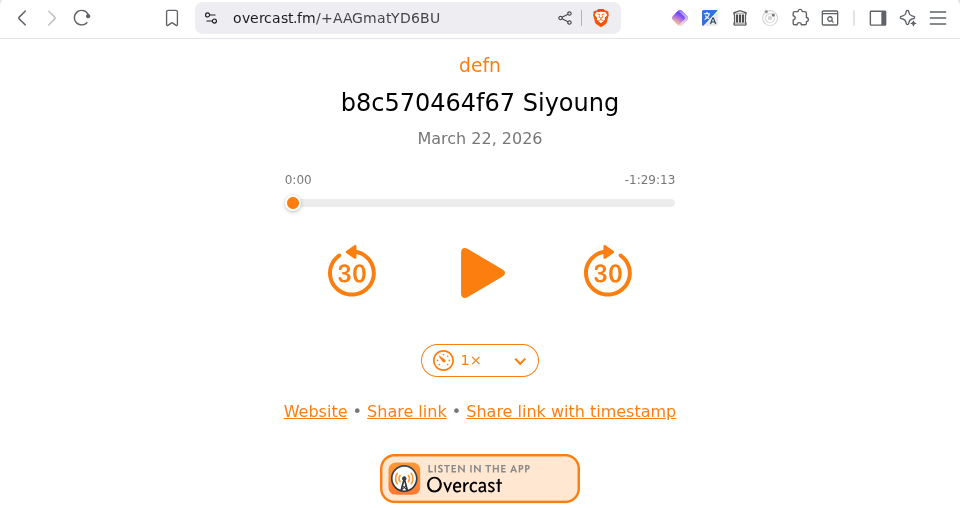
If we inspect the speed control in the browser dev tools, we see some HTML that looks like this:
<div id="speedcontrols">
  <label class="speedmenu" title="Playback speed">
    <img src="/img/symbols/gauge.with.dots.needle.33percent.svg" alt="" draggable="false">
    <select id="speedselect" aria-label="Playback speed">
      <option value="750">0.75×</option>
      <option value="0" selected="">1×</option>
      <option value="1250">1.25×</option>
      <option value="1500">1.5×</option>
      <option value="1750">1.75×</option>
      <option value="2000">2×</option>
      <option value="2500">2.5×</option>
      <option value="3000">3×</option>
    </select>
  </label>
</div>
Let's see what the HTML for our own speed control looks like at this point:
(comment

  ;; ...

  (el->html "#button-speed")
  ;; => "<button aria-label=\"Playback speed\" id=\"button-speed\" class=\"cljcastr playback-button\">\n
  ;;       <img src=\"https://www.svgrepo.com/show/151785/speed-meter.svg\" draggable=\"false\" id=\"button-speed-icon\" class=\"cljcastr playback-icon\"></img>\n
  ;;     </button>\n"

  )
Hrm, that's a little different, innit?
Let's transform our speed button into something more akin to this awesomeness. To do this, we can create a new div, pop a label in there, use the same image as we already are for our button, and add a select with some speed options:
(comment

  ;; ...

  (def speed-control
    (-> (create-el
         {:tag "div", :id "speed-control", :classes ["cljcastr"]
          :children
          [(create-el
            {:tag "label", :id "speed-menu", :classes ["cljcastr"]
             :attrs {:title "Playback speed"}
             :children
             [(get-el "#button-speed-icon")
              (create-el
               {:tag "select", :id "speed-select", :classes ["cljcastr"]
                :attrs {:aria-label "Playback speed"}
                :children
                (->> [0.75 1 1.25 1.5 2]
                     (map (fn [speed]
                            (create-el {:tag "option"
                                        :classes ["cljcastr"]
                                        :text (str speed "x")
                                        :attrs (merge {:value (js/parseFloat speed)}
                                                      (when (= 1 speed)
                                                        {:selected true}))}))))})]})]})
        log))
  ;; => #'cljcastr.player/speed-control

  )
This looks pretty awesome in the console:
<div id="speed-control" class="cljcastr">
<label title="Playback speed" id="speed-menu" class="cljcastr">
<img src="https://www.svgrepo.com/show/151785/speed-meter.svg"
draggable="false" id="button-speed-icon" class="cljcastr playback-icon">
<select aria-label="Playback speed" id="speed-select" class="cljcastr">
<option value="0.75">0.75x</option>
<option value="1">1x</option>
<option value="1.25">1.25x</option>
<option value="1.5">1.5x</option>
<option value="2">2x</option>
</select>
</label>
</div>
However, our speed button seems to have disappeared from the page! Worse yet, if we inspect the DOM, we find that the enclosing button element is still there, just without its img child. 😱
This is because a node can only exist in the DOM once, and when we made img#button-speed-icon a child of the speed label, that removed it as a child of button#button-speed. 😭
Let's reload the page to return to a pristine copy of our player, then create a nice little helper function to make a copy of a node:
(ns cljcastr.player
  (:require [clojure.string :as str]))

;; ...
;; (defn create-el ...)

(defn clone-el
  "Returns a copy of the specified element. A map of overrides may also be
   specified, with the same keys as `create-el`."
  ([el]
   (clone-el el {}))
  ([el overrides]
   (-> (el->clj el)
       (merge overrides)
       create-el)))

;; (defn add-event-listener! ...)
;; ...

(comment

  ;; ...

  (-> (clone-el "#button-speed-icon")
      log)
  ;; => #object[HTMLImageElement [object HTMLImageElement]]

  (= (get-el "#button-speed-icon")
     (clone-el "#button-speed-icon"))
  ;; => false

  )
Cool! Let's try constructing the speed control again:
(comment

  ;; ...

  (def speed-control
    (-> (create-el
         {:tag "div", :id "speed-control", :classes ["cljcastr"]
          :children
          [(create-el
            {:tag "label", :id "speed-menu", :classes ["cljcastr"]
             :attrs {:title "Playback speed"}
             :children
             [(clone-el "#button-speed-icon")
              (create-el
               {:tag "select", :id "speed-select", :classes ["cljcastr"]
                :attrs {:aria-label "Playback speed"}
                :children
                (->> [0.75 1 1.25 1.5 2]
                     (map (fn [speed]
                            (create-el {:tag "option"
                                        :classes ["cljcastr"]
                                        :text (str speed "x")
                                        :attrs (merge {:value (js/parseFloat speed)}
                                                      (when (= 1 speed)
                                                        {:selected true}))}))))})]})]})
        log))
  ;; => #'cljcastr.player/speed-control

  )
This time, our speed button doesn't disappear! 🎉
Let's go ahead and add the speed control to the playback-controls div:
(comment

  ;; ...

  (add-child! "#playback-controls" speed-control)
  ;; => #object[HTMLDivElement [object HTMLDivElement]]

  )
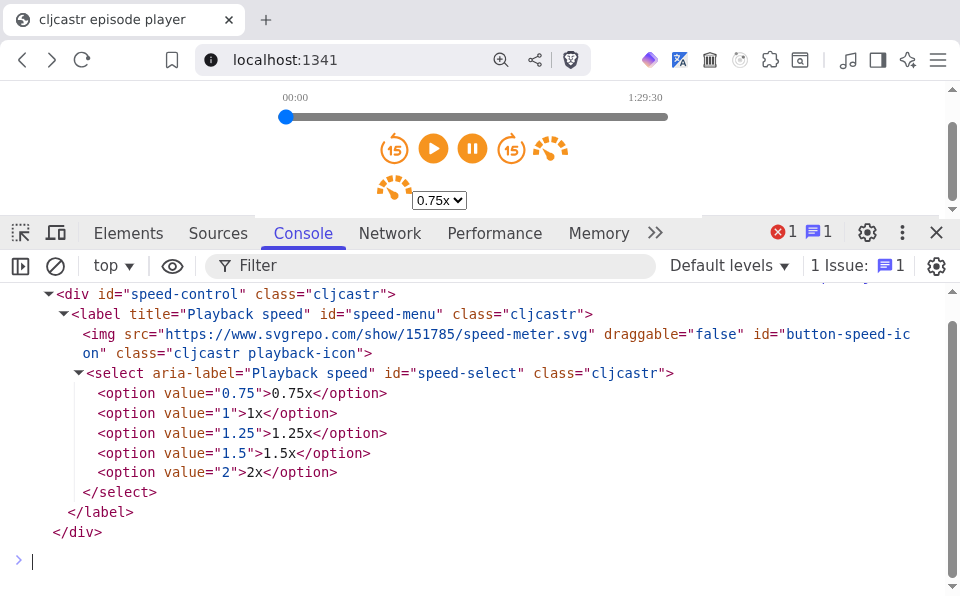
Still, ugly as this is, it's like there or whatever, so let's remove the old speed button:
(ns cljcastr.player
  (:require [clojure.string :as str]))

;; ...
;; (defn add-child! ...)

(defn remove-child!
  "Removes the specified element from the DOM, returning it. A parent node may
   also be specified, for example to disambiguate the selector for a child
   element."
  ([el]
   (let [child (get-el el)]
     (remove-child! (.-parentNode child) child)))
  ([parent child]
   (-> (get-el parent)
       (.removeChild (get-el child)))))

;; (defn clear-children! ...)
;; ...

(comment

  ;; ...

  (remove-child! "#button-speed")
  ;; => #object[HTMLButtonElement [object HTMLButtonElement]]

  )
Before we get serious about beautifying that control, we have one order of business we need to attend to.
Right now, if we select a new speed from our control (such as 1.25x), nothing happens. Which makes sense, because we haven't attached any event listeners to it. 😅
Let's take a look at init-ui!, which is where we add event listeners to all the other controls:
(defn init-ui! []
  (doseq [[el-id {:keys [click-handler]}] playback-controls]
    (add-event-listener! (str "#button-" (name el-id)) "click"
                         click-handler))
  ;; ...
  (log "UI initialised"))
Ah yes, we're iterating over the playback-controls, which currently look like this:
(def playback-controls
  {:play {:src "https://www.svgrepo.com/show/436852/play-circle-fill.svg"
          :label "Play"
          :click-handler #(.play (get-el "audio.cljcastr"))}
   :pause {:src "https://www.svgrepo.com/show/436829/pause-circle-fill.svg"
           :label "Pause"
           :click-handler #(.pause (get-el "audio.cljcastr"))}
   :forward {:src "https://www.svgrepo.com/show/495321/forward-15-seconds.svg"
             :label "Forward {{seek-dur-sec}} seconds"
             :click-handler #(skip-forward! (get-el "audio.cljcastr") seek-dur-sec)}
   :backward {:src "https://www.svgrepo.com/show/495036/backward-15-seconds.svg"
              :label "Back {{seek-dur-sec}} seconds"
              :click-handler #(skip-backward! (get-el "audio.cljcastr") seek-dur-sec)}
   :speed {:src "https://www.svgrepo.com/show/151785/speed-meter.svg"
           :label "Playback speed"}})
That :speed one is going to be a problem, since there is no #button-speed element anymore:
(comment

  ;; ...

  (get-el "#button-speed")
  ;; => nil

  (init-ui!)
  ;; => "#error {:message \"Cannot read properties of null (reading 'addEventListener')\", ...}"

  )
OK, no problem; we just need to remove the :speed entry from playback-controls. And maybe whilst we're at it, rename it playback-buttons, since that's a more accurate name:
(ns cljcastr.player
  (:require [clojure.string :as str]))

;; ...
;; (def seek-dur-sec ...)

(def playback-buttons
  {:play {:src "https://www.svgrepo.com/show/436852/play-circle-fill.svg"
          :label "Play"
          :click-handler #(.play (get-el "audio.cljcastr"))}
   :pause {:src "https://www.svgrepo.com/show/436829/pause-circle-fill.svg"
           :label "Pause"
           :click-handler #(.pause (get-el "audio.cljcastr"))}
   :forward {:src "https://www.svgrepo.com/show/495321/forward-15-seconds.svg"
             :label "Forward {{seek-dur-sec}} seconds"
             :click-handler #(skip-forward! (get-el "audio.cljcastr") seek-dur-sec)}
   :backward {:src "https://www.svgrepo.com/show/495036/backward-15-seconds.svg"
              :label "Back {{seek-dur-sec}} seconds"
              :click-handler #(skip-backward! (get-el "audio.cljcastr") seek-dur-sec)}})

(defn init-ui! []
  (doseq [[el-id {:keys [click-handler]}] playback-buttons]
    (add-event-listener! (str "#button-" (name el-id)) "click"
                         click-handler))
  (let [audio (get-el "audio.cljcastr")]
    (add-event-listener! "#progress-slider" "input"
                         #(->> % .-target .-value (set! (.-currentTime audio))))
    (add-event-listener! audio "timeupdate"
                         #(update-playback-position-indicators!
                           (.-currentTime audio) (.-duration audio)
                           (->> [:elapsed-time
                                 :remaining-time
                                 :progress-slider
                                 :progress-bar]
                                (map (fn [el-id]
                                       [el-id (str "#" (name el-id))]))
                                (into {}))))
    audio)
  (log "UI initialised"))

;; (defn init-ui! ...)
;; ...

(comment

  ;; ...

  (init-ui!)
  ;; => "UI initialised"

  )
Cool, init-ui! is working again. But we still haven't added any event listeners to the speed control. Let's start by figuring out what the event listener should do.
The heart and soul of our speed control is a select element, the value of which will correspond to whichever option is selected:
(comment

  ;; ...

  (get-value "#speed-select")
  ;; => "1.25"

  )
If we look at the documentation for the select element, at the very bottom of the page, we see that select fires "change" and "input" events. "change" seems like the one we're after. Let's check by adding a listener, then selecting "1.5x":
(comment

  ;; ...

  (add-event-listener! "#speed-select" "change"
                       (fn [ev]
                         (let [select-el (.-target ev)]
                           (log "New speed selected:" (get-value select-el)))))
  ;; => #object[HTMLSelectElement [object HTMLSelectElement]]

  )
And when we select "1.5x" and look at the console, we see some familiar logging:
Added listener for change events to                                nrepl.cljs:10
 ‣ <select aria-label="Playback speed" id="speed-select" class="cljcastr">…</select>

Handling change on ‣ <select aria-label="Playback speed" ...>      nrepl.cljs:10
 ‣ Event {isTrusted: true, type: 'change', target: select#speed-select.cljcastr,
   currentTarget: select#speed-select.cljcastr, eventPhase: 2, …}

New speed selected: 1.5                                            nrepl.cljs:10
OK, now that we know we've got the right event, what our event listener needs to do is to take that value and use it to actually set the playback
rate of our audio control. Let's add just such an event listener to init-ui!:
(ns cljcastr.player
  (:require [clojure.string :as str]))

;; ...
;; (def playback-buttons ...)

(defn init-ui! []
  (doseq [[el-id {:keys [click-handler]}] playback-buttons]
    (add-event-listener! (str "#button-" (name el-id)) "click"
                         click-handler))
  (let [audio (get-el "audio.cljcastr")]
    (add-event-listener! "#progress-slider" "input"
                         #(->> % .-target .-value (set! (.-currentTime audio))))
    (add-event-listener! "#speed-select" "change"
                         #(->> % .-target .-value (set! (.-playbackRate audio))))
    (add-event-listener! audio "timeupdate"
                         #(update-playback-position-indicators!
                           (.-currentTime audio) (.-duration audio)
                           (->> [:elapsed-time
                                 :remaining-time
                                 :progress-slider
                                 :progress-bar]
                                (map (fn [el-id]
                                       [el-id (str "#" (name el-id))]))
                                (into {}))))
    audio)
  (log "UI initialised"))

;; (when-not (:initialised? @state))
;; ...

(comment

  ;; ...

  (init-ui!)
  ;; => "UI initialised"

  )
If we now start playing the audio, then select "2x" from the speed select, we should hear the defn theme song on turbo. Before our eyes pop all the way out of our head, we quickly select "0.75x" to slow things down, then click pause.
Just as we start feeling that all is right and good with the world, something in the console catches our eye:
Handling click on                                                  nrepl.cljs:10
 ‣ <button aria-label="Pause" id="button-pause" ...>…</button>
 ‣ PointerEvent {isTrusted: true, pointerId: 1, width: 1, height: 1, …}

Handling click on                                                  nrepl.cljs:10
 ‣ <button aria-label="Pause" id="button-pause" ...>…</button>
 ‣ PointerEvent {isTrusted: true, pointerId: 1, width: 1, height: 1, …}
We clicked the pause button once, but our handler fired twice. 😬
Let's see if we can figure out why by reading the documentation for the addEventListener() method:
Note: If a particular anonymous function is in the list of event listeners registered for a certain target, and then later in the code, an identical anonymous function is given in an addEventListener call, the second function will also be added to the list of event listeners for that target.
Indeed, anonymous functions are not identical even if defined using the same unchanging source-code called repeatedly, even if in a loop.
Repeatedly defining the same unnamed function in such cases can be problematic. (See Memory issues, below.)
Ah-ha! This is exactly what we're doing. It looks like we can fix this by using named functions instead of anonymous ones, but this would mean a lot of code duplication in our handlers. Let's do a little experimentation to see if we can have our anonymous functions and eat them too.
First, let's create an element to do some clicking on, and a named function to serve as an event listener, then add it to the element's "click" listeners, and finally call the element's .click() method:
(comment

  ;; ...

  (def event-testing-el (create-el {:tag "div", :id "event-testing"}))
  ;; => #'cljcastr.player/event-testing-el

  (defn named-f [ev]
    (log "I am Jack's named function"))
  ;; => #'cljcastr.player/named-f

  (.addEventListener event-testing-el "click" named-f)
  ;; => nil

  (.click event-testing-el)
  ;; => nil

  )
If we look at the console, we'll see exactly what we expect:
I am Jack's named function nrepl.cljs:10
And if we add the named function again?
(comment

  ;; ...

  ;; Add named function again
  (.addEventListener event-testing-el "click" named-f)

  ;; Named function only called once
  (.click event-testing-el)
  ;; => nil

  )
Again, the console only shows named-f being called once, despite the fact that we added it as an event listener twice:
I am Jack's named function nrepl.cljs:10
If we create an anonymous function, then add it as an event listener twice, it will still only be called once when the event fires:
(comment

  ;; ...

  (let [anon-f (fn [ev]
                 (log "I am anonymous"))]
    (.addEventListener event-testing-el "click" anon-f)

    ;; Add the same anonymous function again
    (.addEventListener event-testing-el "click" anon-f)

    ;; Each function only called once
    (.click event-testing-el))
  ;; => nil

  )
Quoth the console:
I am Jack's named function                                         nrepl.cljs:10
I am anonymous                                                     nrepl.cljs:10
Finally, let's do exactly what init-el! does:
(comment

  ;; ...

  ;; Add another anonymous function
  (.addEventListener event-testing-el "click"
                     (fn [ev]
                       (log "I am super anonymous")))
  ;; => nil

  ;; Add the "same" anonymous function again
  (.addEventListener event-testing-el "click"
                     (fn [ev]
                       (log "I am super anonymous")))
  ;; => nil

  ;; Super anonymous function called twice
  (.click event-testing-el)
  ;; => nil

  )
With a great sense of trepidation, we look at the console:
I am Jack's named function                                         nrepl.cljs:10
I am anonymous                                                     nrepl.cljs:10
I am super anonymous                                               nrepl.cljs:10
I am super anonymous                                               nrepl.cljs:10
The difference between the anonymous and super anonymous functions is that for the anonymous function, we added the exact same function twice, whereas for the super anonymous one, we added functions that do the exact same thing twice. In other words:
(comment

  ;; ...

  (let [anon-f (fn [ev]
                 (log "I am anonymous"))]
    {:is-anon-f-the-same-as-itself?
     (= anon-f anon-f)
     :is-one-super-anon-f-the-same-as-another?
     (= (fn [ev] (log "I am super anonymous"))
        (fn [ev] (log "I am super anonymous")))})
  ;; => {:is-anon-f-the-same-as-itself? true,
  ;;     :is-one-super-anon-f-the-same-as-another? false}

  )
This is a real head-scratcher, but before we pop into the hammock to wrestle with the problem, let's look at how we can remove event listeners from an element:
(comment

  ;; ...

  (.removeEventListener event-testing-el "click" named-f)
  ;; => nil

  (.removeEventListener event-testing-el "click"
                        (fn [ev]
                          (log "I am super anonymous")))
  ;; => nil

  (.click event-testing-el)
  ;; => nil

  )
The console sez:
I am anonymous                                                     nrepl.cljs:10
I am super anonymous                                               nrepl.cljs:10
I am super anonymous                                               nrepl.cljs:10
As expected, trying to remove the super anonymous function doesn't work, whilst removing named-f does. We can't remove the anonymous function because we don't have a reference to it. 🤷🏼
OK, into the hammock we get!
What we really want with event listeners is the following:
If we squint, #1 looks similar to something else we only wanted to do once: initialise the UI. And how did we handle that?
With our state atom! So let's try that here. First, let's add a new arity to add-event-listener! that accepts an atom along with the rest of the args:
(defn add-event-listener!
  ([el event-type f]
   (add-event-listener! nil el event-type f))
  ([state-atom el event-type f]
   ...))
Now let's think about what we want to happen here. Before adding an event listener, we should first check to see if it has already been added for this event type, and if so, not add it again. This requires us to keep track of all the listeners that have been added for each event type.
Let's give it a go!
(ns cljcastr.player
  (:require [clojure.string :as str]))

;; ...
;; (defn clone-el ...)

(defn add-event-listener!
  "Adds an event listener for the specified event type to an element. If a state
   atom is specified, the listener will be recorded in the state atom. Returns
   the element."
  ([el event-type f]
   (add-event-listener! nil el event-type f))
  ([state-atom el event-type f]
   (let [el (get-el el)
         event-type (keyword event-type)
         listeners (when state-atom
                     (get-in @state-atom [:listeners el event-type]))]
     (if (some #(= f (:f %)) listeners)
       (log "Not adding duplicate" (name event-type) "listener to" el)
       (let [wrapped-f
             (fn [ev]
               (log (str "Handling " (name event-type) " on")
                    el ev)
               (if f
                 (f ev)
                 (log "No event handler function defined")))]
         (.addEventListener el (name event-type) wrapped-f)
         (when state-atom
           (swap! state-atom update-in
                  [:listeners el event-type]
                  conj {:wrapped-f wrapped-f
                        :f f
                        :el-id (get-id el)}))
         (log "Added listener for" (name event-type) "events to" el)))
     el)))

;; (defn save-file! ...)
;; ...

(comment

  ;; ...

  (def event-testing-el (create-el {:tag "div", :id "event-testing"}))
  ;; => #'cljcastr.player/event-testing-el

  (add-event-listener! state event-testing-el :click named-f)
  ;; => #object[HTMLDivElement [object HTMLDivElement]]

  (add-event-listener! state event-testing-el :click named-f)
  ;; => #object[HTMLDivElement [object HTMLDivElement]]

  (.click event-testing-el)
  ;; => nil

  (:listeners @state)
  ;; => {#object[HTMLDivElement [object HTMLDivElement]]
  ;;     {:click [{:wrapped-f #object[Function],
  ;;               :f #object[Function],
  ;;               :el-id "event-testing"}]}}

  )
The console seems to indicate that we're on the right track:
Added listener for click listener to <div id="event-testing">      nrepl.cljs:10

Not adding duplicate listener for click listener to <div ...>      nrepl.cljs:10

Handling click on <div id="event-testing"></div>                   nrepl.cljs:10
 ‣ PointerEvent {isTrusted: true, pointerId: 1, width: 1, height: 1, …}

I am Jack's named function                                         nrepl.cljs:10
add-event-listener! is a bit hard to wrap our heads around (haha, see what I did there?), so let's break down what it does when called with a state atom:
get-el (as with all of our DOM functions, the el argument can be either a DOM element or a CSS selector)event-type into a keyword to normalise it so that the event-type argument can be either a string like "click" or a keyword like :click:listener key with a value that is a map of element to map of event type to vector of listener records (which are maps containing keys :f, :wrapped-f, and :el-id, which will be explained shortly), and grabs the sequence of listener records for this element and event typef argument to add-event-listener!) matches the :f key of any of the listener records.addEventListener() method to add the anonymous function as a listener for the specified event type:f key set to the original listener, the :wrapped-f key set to the anonymous function we just created, and the :el-id key set to the ID of the element (this last is just to make the state atom nicer for human eyes)Now let's try it with our anonymous function:
(comment

  ;; ...

  (let [anon-f (fn [ev]
                 (log "I am anonymous"))]
    (add-event-listener! state event-testing-el "click" anon-f)

    ;; Add the same anonymous function again
    (add-event-listener! state event-testing-el "click" anon-f)

    ;; Each function only called once
    (.click event-testing-el))
  ;; => nil

  )
Looking good so far:
Added listener for click listener to <div id="event-testing">      nrepl.cljs:10

Not adding duplicate listener for click listener to <div ...>      nrepl.cljs:10

Handling click on <div id="event-testing"></div>                   nrepl.cljs:10
 ‣ PointerEvent {isTrusted: true, pointerId: 1, width: 1, height: 1, …}

I am Jack's named function                                         nrepl.cljs:10

Handling click on <div id="event-testing"></div>                   nrepl.cljs:10
 ‣ PointerEvent {isTrusted: true, pointerId: 1, width: 1, height: 1, …}

I am anonymous                                                     nrepl.cljs:10
And now for the final test, the super anonymous function:
(comment

  ;; ...

  (add-event-listener! state event-testing-el "click"
                       (fn [ev]
                         (log "I am super anonymous")))
  ;; => #object[HTMLDivElement [object HTMLDivElement]]

  (add-event-listener! state event-testing-el "click"
                       (fn [ev]
                         (log "I am super anonymous")))
  ;; => #object[HTMLDivElement [object HTMLDivElement]]

  (.click event-testing-el)
  ;; => nil

  )
This time, the console lets us down:
Added listener for click listener to <div id="event-testing">      nrepl.cljs:10

Added listener for click listener to <div id="event-testing">      nrepl.cljs:10

Handling click on <div id="event-testing"></div>                   nrepl.cljs:10
 ‣ PointerEvent {isTrusted: true, pointerId: 1, width: 1, height: 1, …}

I am Jack's named function                                         nrepl.cljs:10

Handling click on <div id="event-testing"></div>                   nrepl.cljs:10
 ‣ PointerEvent {isTrusted: true, pointerId: 1, width: 1, height: 1, …}

I am anonymous                                                     nrepl.cljs:10

Handling click on <div id="event-testing"></div>                   nrepl.cljs:10
 ‣ PointerEvent {isTrusted: true, pointerId: 1, width: 1, height: 1, …}

I am super anonymous                                               nrepl.cljs:10

Handling click on <div id="event-testing"></div>                   nrepl.cljs:10
 ‣ PointerEvent {isTrusted: true, pointerId: 1, width: 1, height: 1, …}

I am super anonymous                                               nrepl.cljs:10
So have we actually accomplished anything? Well, it turns out we have, because now we can write a function to remove all event listeners from an element:
(ns cljcastr.player
  (:require [clojure.string :as str]))

;; ...
;; (defn add-event-listener! ...)

(defn clear-event-listeners!
  "Removes all event listeners from the specified element, or if an event type
   is specified, all listeners for events of that type. Returns the element."
  ([state-atom el]
   (let [el (get-el el)]
     (clear-event-listeners! state-atom el
                             (-> (get-in @state-atom [:listeners el])
                                 keys))))
  ([state-atom el event-types]
   (let [el (get-el el)]
     (doseq [event-type (if (sequential? event-types) event-types [event-types])
             f (get-in @state-atom [:listeners el (keyword event-type)])
             :let [event-type (keyword event-type)]]
       (log "Removing listener for" (name event-type) "events from" el)
       (.removeEventListener el (name event-type) (:wrapped-f f))
       (swap! state-atom update-in [:listeners el event-type]
              (fn [fns] (->> fns
                             (remove #(= f %))
                             (into [])))))
     el)))

;; (defn save-file! ...)
;; ...

(comment

  ;; ...

  (clear-event-listeners! state event-testing-el)
  ;; => #object[HTMLDivElement [object HTMLDivElement]]

  (.click event-testing-el)
  ;; => nil

  )
And if we look at the console, we see four event listeners being removed:
Removing listener for click events from <div id="event-testing">    nrepl.cljs:10

Removing listener for click events from <div id="event-testing">    nrepl.cljs:10

Removing listener for click events from <div id="event-testing">    nrepl.cljs:10

Removing listener for click events from <div id="event-testing">    nrepl.cljs:10
Before moving on, let's address that final annoyance: the inability to add the "same" anonymous function multiple times and only have it fired once.
Step 1 is to ask ourselves why we would want to do that in the first place. 😅
Well, the most likely reason is that we want to develop an event listener interactively, for example:
(comment

  ;; ...

  (defn some-listener [ev]
    (log "Just logging the event"))
  ;; => #'cljcastr.player/some-listener

  (add-event-listener! state event-testing-el :click some-listener)
  ;; => #object[HTMLDivElement [object HTMLDivElement]]

  (.click event-testing-el)
  ;; => nil

  (defn some-listener [ev]
    (let [el (.-target ev)
          event-type (.-type ev)]
      (log "Handling event of type" event-type "on element" el)))
  ;; => #'cljcastr.player/some-listener

  (add-event-listener! state event-testing-el :click some-listener)
  ;; => #object[HTMLDivElement [object HTMLDivElement]]

  (.click event-testing-el)
  ;; => nil

  )
As we've seen, every time we call add-event-listener!, we end up with a new listener attached to the poor element, when what we actually wanted was to replace the listener with a new version of itself. The only problem is that we don't have an identity for the listener, just a value. And by "identity" and "value", we mean in the Hickean sense:
By identity I mean a stable logical entity associated with a series of different values over time. Models need identity for the same reasons humans need identity - to represent the world. How could it work if identities like 'today' or 'America' had to represent a single constant value for all time? Note that by identities I don’t mean names (I call my mother Mom, but you wouldn’t).
So, for this discussion, an identity is an entity that has a state, which is its value at a point in time. And a value is something that doesn’t change. 42 doesn’t change. June 29th 2008 doesn’t change. Points don’t move, dates don’t change, no matter what some bad class libraries may cause you to believe. Even aggregates are values. The set of my favorite foods doesn’t change, i.e. if I prefer different foods in the future, that will be a different set.
Identities are mental tools we use to superimpose continuity on a world which is constantly, functionally, creating new values of itself.
Let's give good 'ol add-event-listener! one more arity, that which accepteth not only a value (of the #object[Function] variety), but also an identity:
(defn add-event-listener!
  "Adds an event listener for the specified event type to an element. If a state
   atom is specified, the listener will be recorded in the state atom. Returns
   the element."
  ([el event-type f]
   (add-event-listener! nil el event-type f))
  ([state-atom el event-type f]
   (add-event-listener! nil el event-type f nil))
  ([state-atom el event-type f id]
   ...))
Before we write the code, let's make sure we know what we want to do when we get a new function value for the same identity:
Let's write ourselves a function that removes a single listener:
(ns cljcastr.player
  (:require [clojure.string :as str]))

;; ...
;; (defn clone-el ...)

(defn remove-event-listener!
  "Removes the event listener with the specified id and event type."
  ([state-atom el event-type f]
   (remove-event-listener! state-atom el event-type f nil))
  ([state-atom el event-type f id]
   (let [el (get-el el)
         event-type (keyword event-type)
         path [:listeners el event-type]]
     (when-let [record (some #(and (if id
                                    (= id (:id %))
                                    (= f (:f %)))
                                   %)
                             (get-in @state-atom path))]
       (.removeEventListener el (name event-type) (:wrapped-f record))
       (swap! state-atom update-in path
              (fn [fns] (->> fns
                             (remove #(= record %))
                             (into []))))))))

;; (defn add-event-listener! ...)
;; ...

(comment

  ;; ...

  @state
  ;; => {:initialised? true,
  ;;     :listeners
  ;;     {#object[HTMLDivElement [object HTMLDivElement]]
  ;;      {:click
  ;;       ({:wrapped-f #object[Function], :f #object[Function], :el-id "event-testing"}
  ;;        {:wrapped-f #object[Function], :f #object[Function], :el-id "event-testing"})}}}

  (remove-event-listener! state event-testing-el :click some-listener)
  ;; => {:initialised? true,
  ;;     :listeners
  ;;     {#object[HTMLDivElement [object HTMLDivElement]]
  ;;      {:click
  ;;       [{:wrapped-f #object[Function], :f #object[Function], :el-id "event-testing"}]}}}

  (.click event-testing-el)
  ;; => nil

  )
Let's refactor this a bit to improve readability:
(ns cljcastr.player
  (:require [clojure.string :as str]))

;; ...
;; (defn clone-el ...)

(defn get-listener-record
  ([state-atom el event-type f]
   (get-listener-record state-atom el event-type f nil))
  ([state-atom el event-type f id]
   (let [el (get-el el)
         event-type (keyword event-type)]
     (some #(and (if id
                   (= id (:id %))
                   (= f (:f %)))
                 %)
           (get-in @state-atom [:listeners el event-type])))))

(defn remove-event-listener!
  "Removes the event listener with the specified id and event type."
  ([state-atom el event-type f]
   (remove-event-listener! state-atom el event-type f nil))
  ([state-atom el event-type f id]
   (let [el (get-el el)
         event-type (keyword event-type)]
     (when-let [record
                (get-listener-record state el :click f id)]
       (.removeEventListener el (name event-type) (:wrapped-f record))
       (swap! state-atom update-in [:listeners el event-type]
              (fn [fns] (->> fns
                             (remove #(or (= record %)
                                          (and id (= id (:id %)))))
                             (into []))))))))

;; (defn add-event-listener! ...)
;; ...

(comment

  ;; ...

  (add-event-listener! state event-testing-el :click some-listener)
  ;; => #object[HTMLDivElement [object HTMLDivElement]]

  (get-listener-record state event-testing-el :click some-listener)
  ;; => {:wrapped-f #object[Function], :f #object[Function], :el-id "event-testing"}

  (remove-event-listener! state event-testing-el :click some-listener)
  ;; => {:initialised? true,
  ;;     :listeners
  ;;     {#object[HTMLDivElement [object HTMLDivElement]]
  ;;      {:click
  ;;       [{:wrapped-f #object[Function], :f #object[Function], :el-id "event-testing"}]}}}

  )
With these lovely functions, we can now update add-event-listener! to handle an id:
(ns cljcastr.player
  (:require [clojure.string :as str]))

;; ...
;; (defn remove-event-listener! ...)

(defn add-event-listener!
  "Adds an event listener for the specified event type to an element. If a state
   atom is specified, the listener will be recorded in the state atom. Returns
   the element."
  ([el event-type f]
   (add-event-listener! nil el event-type f))
  ([state-atom el event-type f]
   (add-event-listener! state-atom el event-type f nil))
  ([state-atom el event-type f id]
   (let [el (get-el el)
         event-type (keyword event-type)
         path [:listeners el event-type]
         listeners (when state-atom
                     (get-in @state-atom path))]
     (if (some #(= f (:f %)) listeners)
       (log "Not adding duplicate" (name event-type) "listener to" el)
       (let [wrapped-f
             (fn [ev]
               (log (str "Handling " (name event-type) " on")
                    el ev)
               (if f
                 (f ev)
                 (log "No event handler function defined")))]
         (remove-event-listener! state-atom el event-type f id)
         (.addEventListener el (name event-type) wrapped-f)
         (when state-atom
           (swap! state-atom update-in path
                  conj {:id id
                        :wrapped-f wrapped-f
                        :f f
                        :el-id (get-id el)}))
         (log "Added listener for" (name event-type) "events to" el)))
     el)))

;; (defn clear-event-listeners! ...)
;; ...

(comment

  ;; ...

  (clear-event-listeners! state event-testing-el)
  ;; => #object[HTMLDivElement [object HTMLDivElement]]

  (add-event-listener! state event-testing-el :click
                       some-listener :some-listener)
  ;; => #object[HTMLDivElement [object HTMLDivElement]]

  (defn some-listener [ev]
    (let [el (.-target ev)
          event-type (.-type ev)]
      (log "Handling event" ev "on element" el)))
  ;; => #'cljcastr.player/some-listener

  (add-event-listener! state event-testing-el :click
                       some-listener :some-listener)
  ;; => #object[HTMLDivElement [object HTMLDivElement]]

  (.click event-testing-el)
  ;; => nil

  )
Now we can update init-ui! to add an ids to our listeners so we can iterate on them as we go:
(ns cljcastr.player
  (:require [clojure.string :as str]))

;; ...
;; (def playback-buttons ...)

(defn init-ui! []
  (doseq [[el-id {:keys [click-handler]}] playback-buttons]
    (add-event-listener! state (str "#button-" (name el-id)) :click
                         click-handler el-id))
  (let [audio (get-el "audio.cljcastr")]
    (add-event-listener! state "#progress-slider" "input"
                         #(->> % .-target .-value (set! (.-currentTime audio)))
                         :seek)
    (add-event-listener! state "#speed-select" "change"
                         #(->> % .-target .-value (set! (.-playbackRate audio)))
                         :speed)
    (add-event-listener! state audio "timeupdate"
                         #(update-playback-position-indicators!
                           (.-currentTime audio) (.-duration audio)
                           (->> [:elapsed-time
                                 :remaining-time
                                 :progress-slider
                                 :progress-bar]
                                (map (fn [el-id]
                                       [el-id (str "#" (name el-id))]))
                                (into {})))
                         :time-update)
    audio)
  (log "UI initialised"))

;; (when-not ...)
;; ...
Next time we reload the page, we'll get nice handlers. But let's not do that quite yet; instead, let's make our speed control look nicer.
If we cast our gaze back to the dev tools panel in our Overcast web player browser tab, we see the following styles being applied to the speed menu label:
.speedmenu {
  position: relative;
  display: inline-flex;
  align-items: center;
  gap: 0.4em;
  color: #fc7e0f;
  border: 1px solid #fc7e0f;
  border-radius: 999px;
  padding: 5px 12px 5px 11px;
  cursor: pointer;
  -webkit-tap-highlight-color: transparent;
  transition: background-color 0.1s ease-out;
}

.speedmenu::after {
  content: "";
  position: absolute;
  right: 13px;
  top: 50%;
  width: 0.4em;
  height: 0.4em;
  border-right: 2px solid currentColor;
  border-bottom: 2px solid currentColor;
  transform: translateY(-65%) rotate(45deg);
  pointer-events: none;
}
Let's ignore that weird .speedmenu::after ruleset for now, because we only pseudo-understand pseudo-elements like ::after and just focus on the .speedmenu ruleset. Wouldn't it be lovely if we could turn this CSS text into a styles map of the sort we feed to functions like set-styles! and so on?
(ns cljcastr.player
  (:require [clojure.string :as str]))

;; ...
;; (defn clone-el ...)

(defn css->styles
  "Returns a map of styles corresponding to the specified CSS style
   declaration."
  [css]
  (let [styles-str (-> css
                       (str/replace "\n" " ")
                       (str/replace #"^.+[{]([^}]+)[}].*$" "$1"))]
    (-> (create-el {:tag "div", :attrs {:style styles-str}})
        get-styles)))

;; (defn add-event-listener! ...)
;; ...

(comment

  ;; ...

  (let [css "
.speedmenu {
  position: relative;
  display: inline-flex;
  align-items: center;
  gap: 0.4em;
  color: #fc7e0f;
  border: 1px solid #fc7e0f;
  border-radius: 999px;
  padding: 5px 12px 5px 11px;
  cursor: pointer;
  -webkit-tap-highlight-color: transparent;
  transition: background-color 0.1s ease-out;
}"]
    (css->styles css))
  ;; => {:align-items "center",
  ;;     :color "#fc7e0f",
  ;;     :transition "background-color 0.1s ease-out",
  ;;     :cursor "pointer",
  ;;     :position "relative",
  ;;     :padding "5px 12px 5px 11px",
  ;;     :gap "0.4em",
  ;;     :-webkit-tap-highlight-color "transparent",
  ;;     :display "inline-flex",
  ;;     :border "1px solid #fc7e0f",
  ;;     :border-radius "999px"}

  )
Let's just set the styles of our #speed-menu label to these and see what that looks like:
(comment

  ;; ...

  (let [css "
.speedmenu {
  position: relative;
  display: inline-flex;
  align-items: center;
  gap: 0.4em;
  color: #fc7e0f;
  border: 1px solid #fc7e0f;
  border-radius: 999px;
  padding: 5px 12px 5px 11px;
  cursor: pointer;
  -webkit-tap-highlight-color: transparent;
  transition: background-color 0.1s ease-out;
}"]
    (->> css
         css->styles
         (set-styles! "#speed-menu")))
  ;; => #object[HTMLLabelElement [object HTMLLabelElement]]

  )
And what to our wondering eyes should appear but some rounded corners and a border so dear!
The select is still looking a bit plain though, so let's take a look at how it's styled in Overcast and rinse and repeat our style-snagging:
(comment

  ;; ...

  (let [css "
.speedmenu select {
  -webkit-appearance: none;
  -moz-appearance: none;
  appearance: none;
  font: inherit;
  font-size: 0.9em;
  font-variant-numeric: tabular-nums;
  color: inherit;
  background: transparent;
  border: 0;
  margin: 0;
  padding: 0 1.4em 0 0;
  cursor: pointer;
  outline: none;
}"]
    (->> css
         css->styles
         (set-styles! "#speed-select")))
  ;; => #object[HTMLSelectElement [object HTMLSelectElement]]

  )
Now we're getting somewhere!
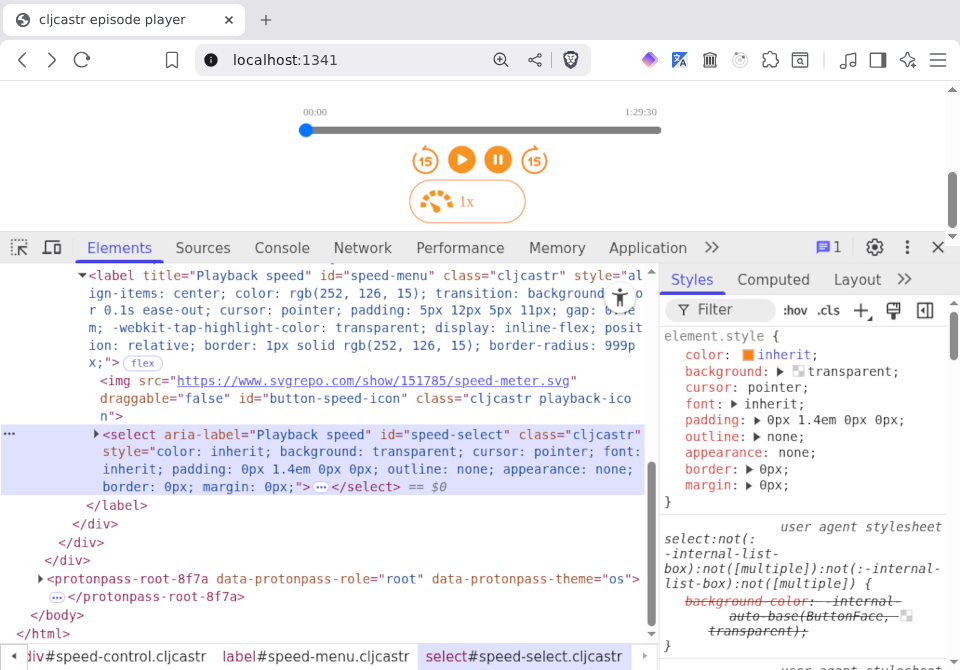
The only thing that the Overcast player has that we don't is that cool looking ▼ thingy that makes it all clicky-looking. And how pray tell did it get there? Could it be related to that .speedmenu::after ruleset that we handwaved away previously? This of course is a rhetorical question to which we already know the answer, so let's go ahead and apply them to our #speed-menu label.
(comment

  ;; ...

  (let [css "
.speedmenu::after {
  content: \"\";
  position: absolute;
  right: 13px;
  top: 50%;
  width: 0.4em;
  height: 0.4em;
  border-right: 2px solid currentColor;
  border-bottom: 2px solid currentColor;
  transform: translateY(-65%) rotate(45deg);
  pointer-events: none;
}"]
    (->> css
         css->styles
         (set-styles! "#speed-select::after")))
  ;; => "#error {:message \"Cannot set properties of null (setting 'style')\", ...}"

  )
Oops! Maybe that's why they call it a pseudo-element, eh? 😅
However, there are three ways to get CSS styles into our document:
So far, we've only used numbers 1 and 3. Let's see if the second can help us out of this pseudo-jam we're in.
First, let's prove to ourselves that we can put a style tag in the right place and play around with the page:
(comment

  ;; ...

  (->> (create-el {:tag "style", :id "css-rulesets", :text "div { color: red; }"})
       (add-child! "head"))
  ;; => #object[HTMLHeadElement [object HTMLHeadElement]]

  )
That worked! Of course, it looks pretty terrible, so let's put things back the way we found them:
(comment

  ;; ...

  (set-text! "#css-rulesets" "div { color: black; }")
  ;; => #object[HTMLStyleElement [object HTMLStyleElement]]

  )
OK, now let's get more Clojurey. First, let's write a function that turns a chunk of CSS into a sequence of rulesets, and then add an arity that turns the chunk of CSS in the style#css-rulesets tag into a sequence of rulesets:
(ns cljcastr.player
  (:require [clojure.string :as str]))

;; ...
;; (defn css->styles ...)

(defn get-rulesets
  "Returns a sequence of CSS rulesets from either the specified CSS string if
   present or the contents of the `style#css-rulesets` element otherwise. Each
   ruleset is a pair of condition (i.e. the list of selectors associated with a
   given CSS declaration block) and map corresponding to the CSS styles in the
   declaration block.

   See https://developer.mozilla.org/en-US/docs/Web/CSS/Guides/Syntax/Introduction#css_rulesets
   for explanations of CSS terminology like ruleset, condition, and declaration
   block.

   Example:

     (get-rulesets \"div { color: red; } a { color: blue; }\")
     ;; => [[\"div\" {:color \"red\"}] [\"a\" {:color \"blue\"}]]"
  ([]
   (when-let [el (get-el "style#css-rulesets")]
     (-> (get-text el) get-rulesets)))
  ([css]
   (when-not (empty? css)
     (->> css
          (re-seq #"(?s)^\s*([^{]+)\s*[{]([^}]+)[}]")
          (map (fn [[_match sel declarations]]
                 [(str/trim sel) (css->styles declarations)]))))))

;; (defn add-event-listener! ...)
;; ...

(comment

  ;; ...

  (get-rulesets)
  ;; => (["div" {:color "black"}])

  (let [css "
.speedmenu {
  position: relative;
  display: inline-flex;
  align-items: center;
  gap: 0.4em;
  color: #fc7e0f;
  border: 1px solid #fc7e0f;
  border-radius: 999px;
  padding: 5px 12px 5px 11px;
  cursor: pointer;
  -webkit-tap-highlight-color: transparent;
  transition: background-color 0.1s ease-out;
}

.speedmenu::after {
  content: \"\";
  position: absolute;
  right: 13px;
  top: 50%;
  width: 0.4em;
  height: 0.4em;
  border-right: 2px solid currentColor;
  border-bottom: 2px solid currentColor;
  transform: translateY(-65%) rotate(45deg);
  pointer-events: none;
}
"]
    (get-rulesets css))
  ;; => ([".speedmenu"
  ;;      {:align-items "center", :color "#fc7e0f", ...}]
  ;;     [".speedmenu::after"
  ;;      {:border-right "2px solid currentColor", :transform "translateY(-65%) rotate(45deg)", ...}])

  )
Now that we have this, we can write a few more functions for manipulating rulesets:
(ns cljcastr.player
  (:require [clojure.string :as str]))

;; ...
;; (defn get-rulesets ...)

(defn rulesets->css
  "Given a sequence of rulesets, returns the corresponding CSS."
  [rulesets]
  (->> rulesets
       (map (partial apply format-css))
       (str/join "\n\n")))

(defn set-stylesheet!
  "Sets the document's stylesheet to the specified CSS and returns it."
  [css]
  (when-not (get-el "style#css-rulesets")
    (->> (create-el {:tag "style", :id "css-rulesets"})
         (add-child! "head")))
  (set-text! "style#css-rulesets" css)
  css)

(defn set-rulesets!
  "Given a sequence of rulesets, transforms them into a stylesheet which becomes
   the text of the `style#css-rulesets` element. Returns the stylesheet."
  [rulesets]
  (-> (rulesets->css rulesets)
      set-stylesheet!))

;; (defn add-event-listener! ...)
;; ...

(comment

  ;; ...

  (let [rulesets [["#speed-menu::after"
                   {:border-right "2px solid currentColor"
                    :transform "translateY(-65%) rotate(45deg)"
                    :top "50%"
                    :content "\"\""
                    :width "0.4em"
                    :right "13px"
                    :position "absolute"
                    :pointer-events "none"
                    :height "0.4em"
                    :border-bottom "2px solid currentColor"}]]]
    (set-rulesets! rulesets))
  ;; => "#speed-menu::after {\n  border-right: 2px solid currentColor;\n  ...}"

  )
With this, we have finally achieved aesthetic perfection!
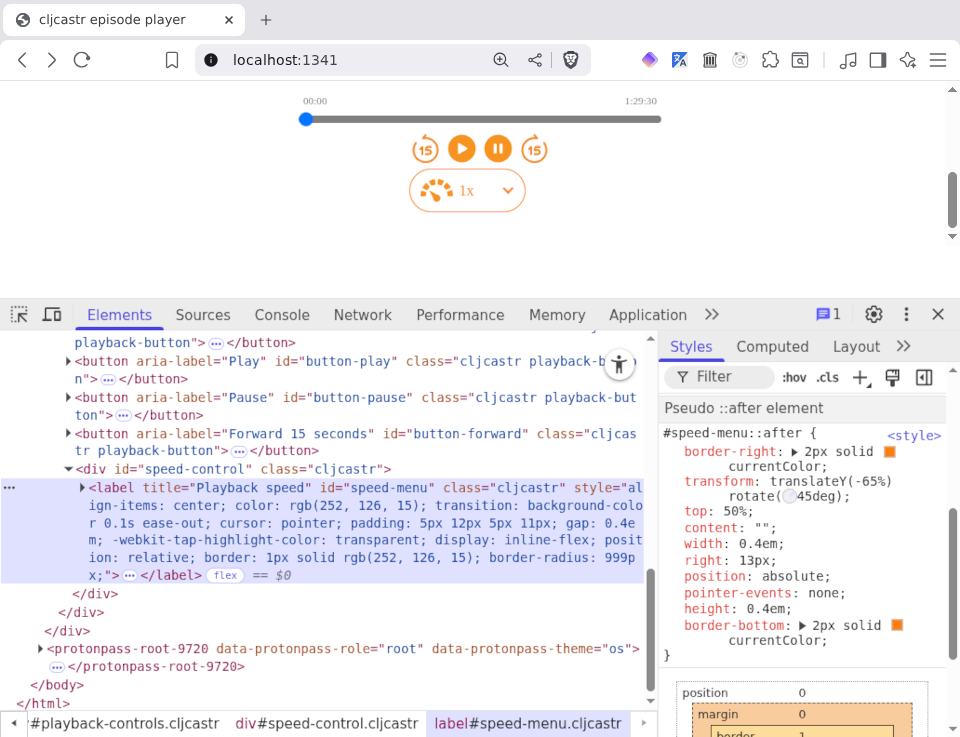
Before moving on, let's imagine that we'd like to turn our episode info red again. We could of course do something like this:
(comment

  ;; ...

  (-> (get-rulesets)
      (concat [["#episode-info *" {:color "red"}]])
      set-rulesets!)
  ;; => "#speed-menu::after {\n  border-right: 2px solid currentColor;\n ...}\n\n
  ;;     #episode-info * {\n  color: red\n}"

  )
But why not have a function that does this and has the benefit of a meaningful name?
(ns cljcastr.player
  (:require [clojure.string :as str]))

;; ...
;; (defn set-rulesets! ...)

(defn add-rulesets!
  "Adds the specified rulesets to the document's stylesheet, returning the new
   stylesheet."
  [rulesets]
  (-> (get-rulesets)
      (concat rulesets)
      set-rulesets!))

(defn add-ruleset!
  "Adds the specified ruleset to the document's stylesheet, returning the new
   stylesheet."
  [ruleset]
  (add-rulesets! [ruleset]))

;; (defn add-event-listener! ...)
;; ...

(comment

  ;; ...

  (add-ruleset! ["#episode-info *" {:color "red"}])
  ;; => "#speed-menu::after {\n  border-right: 2px solid currentColor; ... }\n\n
  ;;     #episode-info * {\n  color: red\n}\n\n
  ;;     #episode-info * {\n  color: red\n}"

  )
Oops, we probably don't want to repeat the "episode-info *" ruleset. Let's update add-rulesets! to deduplicate rulesets:
(ns cljcastr.player
  (:require [clojure.string :as str]))

;; ...
;; (defn set-rulesets! ...)

(defn dedup-rulesets
  "Deduplicates rulesets by taking the last ruleset for each selector."
  [rulesets]
  (->> rulesets
       (group-by first)
       (map (fn [[_sel rulesets']]
              (last rulesets')))))

(defn add-rulesets!
  "Adds the specified rulesets to the document's stylesheet, returning the new
   stylesheet."
  [rulesets]
  (-> (get-rulesets)
      (concat rulesets)
      dedup-rulesets
      set-rulesets!))

;; (defn add-ruleset! ...)
;; ...

(comment

  ;; ...

  (add-ruleset! ["#episode-info *" {:color "red"}])
  ;; => "#speed-menu::after {\n  border-right: 2px solid currentColor; ... }\n\n
  ;;     #episode-info * {\n  color: red\n}"

  )
That's better!
Now let's consider a world in which we'd like to make that down arrow thingy a bit more impressive. We could of course copy and paste the "#speed-menu::after" ruleset from above in our Rich comment, change the border-right and border-bottom declarations, and then use add-ruleset! to overwrite the existing ruleset, but again, this doesn't communicate our intent all that well to a future reader of the code (which is highly likely to be ourselves). Surely we can do better than that!
(ns cljcastr.player
  (:require [clojure.string :as str]))

;; ...
;; (defn get-rulesets ...)

(defn get-ruleset
  "Returns the CSS ruleset from the active stylesheet (i.e. the contents of the
   `style#css-rulesets` element) corresponding to the specified selector."
  [sel]
  (->> (get-rulesets)
       (some (fn [[rs-sel _declarations :as ruleset]]
               (and (= sel rs-sel) ruleset)))))

;; (defn rulesets->css ...)
;; ...
;; (defn add-ruleset! ...)

(defn update-ruleset!
  "Updates the declarations in the ruleset with the same selector by merging the
   existing declarations with the declarations of the specified ruleset. Returns
   the new stylesheet."
  [[sel declarations :as ruleset]]
  (let [[_sel cur-declarations] (get-ruleset sel)]
    (add-ruleset! [sel (merge cur-declarations declarations)])))

;; (defn add-event-listener! ...)
;; ...

(comment

  ;; ...

  (get-ruleset "#episode-info *")
  ;; => ["#episode-info *" {:color "red"}]

  (update-ruleset! ["#speed-menu::after"
                    {:border-right "5px solid currentColor"
                     :border-bottom "5px solid currentColor"}])
  ;; => "#speed-menu::after {\n  border-right: 5px solid currentColor; ...}\n\n
  ;;     #episode-info * {\n  color: red\n}"

  )
Now that we have all these functions, let's put things back into a good state:
(comment

  ;; ...

  (let [rulesets [["#speed-menu::after"
                   {:border-right "2px solid currentColor"
                    :transform "translateY(-65%) rotate(45deg)"
                    :top "50%"
                    :content "\"\""
                    :width "0.4em"
                    :right "13px"
                    :position "absolute"
                    :pointer-events "none"
                    :height "0.4em"
                    :border-bottom "2px solid currentColor"}]]]
    (set-rulesets! rulesets))
  ;; => "#speed-menu::after {\n  border-right: 2px solid currentColor;\n  ...}"

  )
Hurrah! Our episode info text is back to black and the down arrow is svelte once more. Now that all is right with the world, let's export a new stylesheet from the current state of our DOM.
Since we've built up quite the visually impressive player, let's proceed carefully. We'll call save-css! with a different filename and take a look at the resulting styles instead of just blithely overwriting our main.css file:
(comment

  ;; ...

  (save-css! "test.css")
  ;; => nil

  )
Now we can take a look at the contents of the test.css file:
#speed-menu {
  align-items: center;
  color: rgb(252, 126, 15);
  transition: background-color 0.1s ease-out;
  cursor: pointer;
  padding: 5px 12px 5px 11px;
  gap: 0.4em;
  -webkit-tap-highlight-color: transparent;
  display: inline-flex;
  position: relative;
  border: 1px solid rgb(252, 126, 15);
  border-radius: 999px;
}

#speed-select {
  color: inherit;
  background: transparent;
  cursor: pointer;
  font: inherit;
  padding: 0px 1.4em 0px 0px;
  outline: none;
  appearance: none;
  border: 0px;
  margin: 0px;
}
Good thing we were cautious! 😅
If we think back to what save-css! actually does, the reason for this becomes clear:
(defn dom->css []
  (->> (get-els ".cljcastr")
       group-styles
       (map (fn [[_styles [el & rest-els]]]
              (if (seq rest-els)
                (let [sel (str "." (->> (:classes el)
                                        (remove (partial = "cljcastr"))
                                        first))]
                  (el->css el sel))
                (el->css el))))
       (str/join "\n\n")
       log))

(defn save-css!
  ([]
   (save-css! "main.css"))
  ([filename]
   (save-css! filename (dom->css)))
  ([filename css]
   (save-file! filename css "text/css")))
Right, we're only handling inline styles, and as noted earlier, there are actually three ways to get styles into the DOM:
Let's update dom->css to handle all three.
The first thing to note is that order matters with CSS rulesets, and when the page is loaded, the browser will first apply any stylesheets named by link elements where the value of their rel attribute is "stylesheet" (in the order in which they appear in the DOM), then stylesheets included in style elements (in the order in which they appear in the DOM), then inline styles.
With that knowledge in hand, let's make dom->css handle style elements. This one is a little tricky, so let's experiment in the REPL a bit before we actually make any changes to the function:
(comment

  ;; ...

  ;; Turn the contents of all style elements into CSS rulesets
  (->> (get-els "style")
       (mapcat (comp get-rulesets get-text)))
  ;; => (["#speed-menu::after" {:border-right "2px solid currentColor", ...}])

  ;; Turn inline styles into CSS rulesets: grab the body of the current dom->css
  ;; function and slap a call to get-rulesets on the end
  (->> (get-els ".cljcastr")
       group-styles
       (map (fn [[_styles [el & rest-els]]]
              (if (seq rest-els)
                (let [sel (str "." (->> (:classes el)
                                        (remove (partial = "cljcastr"))
                                        first))]
                  (el->css el sel))
                (el->css el))))
       (str/join "\n\n")
       get-rulesets)

  ;; Combine the rulesets and turn them into CSS
  (->> (concat (->> (get-els "style")
                    (mapcat (comp get-rulesets get-text)))
               (->> (dom->css)
                    get-rulesets))
       dedup-rulesets
       rulesets->css)
  ;; => "#speed-menu::after {\n  border-right: 2px solid currentColor;\n  ... }\n\n
  ;;     #speed-menu {\n  align-items: center;\n  color: rgb(252, 126, 15);\n  ... }\n\n
  ;;     #speed-select {\n  color: inherit;\n  background: transparent;\n  ... }"

  )
With these building blocks, we're ready to tackle dom->css:
(ns cljcastr.player
  (:require [clojure.string :as str]))

;; ...
;; (defn save-html! ...)

(defn dom->css []
  (let [style-rulesets (->> (get-els "style")
                            (mapcat (comp get-rulesets get-text)))
        inline-rulesets (->> (get-els ".cljcastr")
                             group-styles
                             (map (fn [[_styles [el & rest-els]]]
                                    (if (seq rest-els)
                                      (let [sel (str "." (->> (:classes el)
                                                              (remove (partial = "cljcastr"))
                                                              first))]
                                        (el->css el sel))
                                      (el->css el))))
                             (str/join "\n\n")
                             get-rulesets)]
    (->> (concat style-rulesets inline-rulesets)
         dedup-rulesets
         rulesets->css)))

;; (defn save-css! ...)
;; ...

(comment

  ;; ...

  (dom->css)
  ;; => "#speed-menu::after {\n  border-right: 2px solid currentColor;\n  ... }\n\n
  ;;     #speed-menu {\n  align-items: center;\n  color: rgb(252, 126, 15);\n  ... }\n\n
  ;;     #speed-select {\n  color: inherit;\n  background: transparent;\n  ... }"

  )
We're making progress here, as evidenced by the new contents of test.css:
#speed-menu::after {
  border-right: 2px solid currentColor;
  transform: translateY(-65%) rotate(45deg);
  top: 50%;
  content: "";
  width: 0.4em;
  right: 13px;
  position: absolute;
  pointer-events: none;
  height: 0.4em;
  border-bottom: 2px solid currentColor
}

#speed-menu {
  align-items: center;
  color: rgb(252, 126, 15);
  transition: background-color 0.1s ease-out;
  cursor: pointer;
  padding: 5px 12px 5px 11px;
  gap: 0.4em;
  -webkit-tap-highlight-color: transparent;
  display: inline-flex;
  position: relative;
  border: 1px solid rgb(252, 126, 15);
  border-radius: 999px
}

#speed-select {
  color: inherit;
  background: transparent;
  cursor: pointer;
  font: inherit;
  padding: 0px 1.4em 0px 0px;
  outline: none;
  appearance: none;
  border: 0px;
  margin: 0px
}
Now all that's left to do is handle the link elements.
First, let's just grab all of the stylesheet links in the DOM:
(comment

  ;; ...

  (->> (get-els "link[rel=\"stylesheet\"]")
       (map #(get-attr % :href)))
  ;; => ("main.css")

  )
Now if there was just a way to fetch those files and grab their contents... like the Window.fetch() function, perhaps?
(comment

  ;; ...

  (let [url "main.css"]
    (js/fetch (js/Request. url)))
  ;; => #<Promise #object[Response [object Response]]>

  )
Oh my! What can we do with a promise?
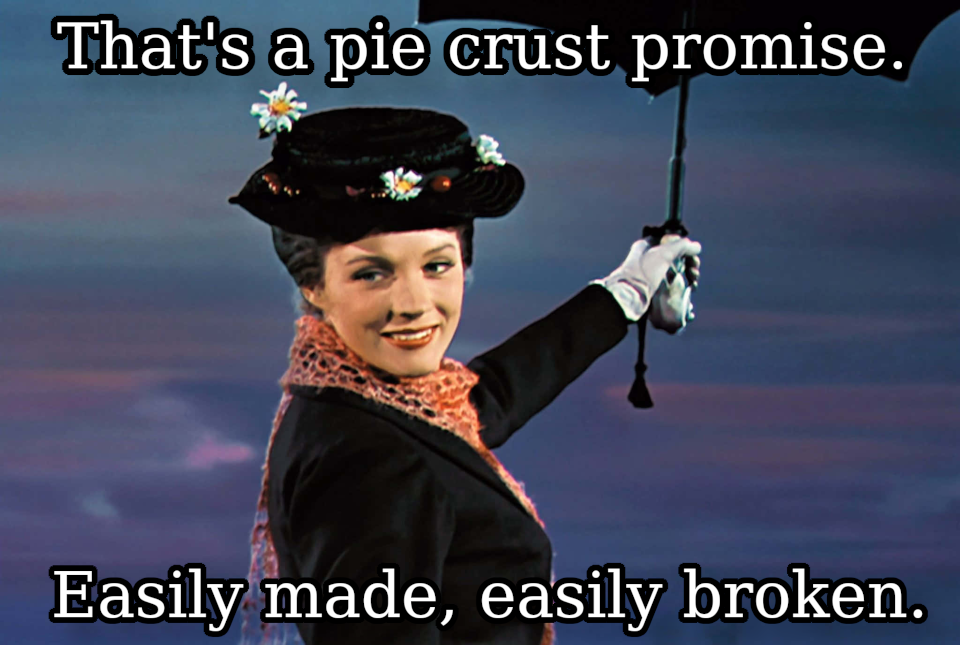
Well, it seems that the standard sort of thing is using Promise.then() to register a callback that fires when the promise is complete. Let's try that:
(comment

  ;; ...

  (let [url "main.css"]
    (-> (js/fetch (js/Request. url))
        (.then #(log "fetch returned:" %))))
  ;; => #<Promise #object[Response [object Response]]>

  )
If we peer over at the JS console, things look promising (pun not initially intended but now celebrated):
fetch returned:                                                    nrepl.cljs:10
▼   Response {type: 'basic', status: 200, ok: true, ...}
    body: (...)
    bodyUsed: false
  ‣ headers: Headers {}
    ok: true
    redirected: false
    status: 200
    statusText: "OK"
    type: "basic"
    url: "http://localhost:1341/main.css"
  ‣ [[Prototype]]: Response
Cool! Now let's see what we can do with a Response:
(comment

  ;; ...

  (let [url "main.css"]
    (-> (js/fetch (js/Request. url))
        (.then (fn [resp]
                 (log "fetch returned:" resp)
                 (.text resp)))))
  ;; => #<Promise "#progress-container {\n  position: relative;\n  ...">

  )
Now if we just turn that CSS into rulesets:
(comment

  ;; ...

  (let [url "main.css"]
    (-> (js/fetch (js/Request. url))
        (.then (fn [resp]
                 (log "fetch returned:" resp)
                 (-> (.text resp)
                     get-rulesets)))))
  ;; => #error {:message "[object Promise] is not ISeqable", ... }

  )
Oops, looks like Response.text() also returns a promise. No problem, we'll just call then() on that one as well:
(comment

  ;; ...

  (let [url "main.css"]
    (-> (js/fetch (js/Request. url))
        (.then (fn [resp]
                 (log "fetch returned:" resp)
                 (.text resp)))
        (.then (fn [text]
                 (log "got text:" text)
                 (->> (get-rulesets text)
                      (log "rulesets:"))))))
  ;; => #<Promise (["#progress-container" {:position "relative", ...}] ...)>

  )
The console verifies that this has worked:
fetch returned:                                                    nrepl.cljs:10
 ‣ Response {type: 'basic', status: 200, ok: true, ...}

got text: #progress-container {                                    nrepl.cljs:10
  position: relative;
  height: 28px;
  clear: both;
}

...

rulesets:                                                          nrepl.cljs:10
   (13) [Array(2), Array(2), Array(2), Array(2), Array(2), Array(2), Array(2),
 ‣ Array(2), Array(2), Array(2), Array(2), Array(2), Array(2)]
We could take this code and add it to dom->css, but all of those .then() calls are frankly pretty annoying. Let's see if there's something we can do about this.
Luckily, ClojureScript recently (as of this writing, dunno when you're reading) added support for JavaScript async functions, and Scittle followed suit shortly after that. Let's create a function to fetch some text from a URL and see how this works:
(ns cljcastr.player
  (:require [clojure.string :as str]))

;; ...
;; (defn log ...)

(defn ^:async fetch-text
  "Fetches the specified URL and returns a promise to deliver the response body
   as text."
  [url]
  (let [resp (await (js/fetch (js/Request. url)))]
    (->> (await (.text resp))
         (log "Fetched text from url:" url))))

;; (defn render ...)
;; ...

(comment

  ;; ...

  (let [url "main.css"
        fetch-rulesets (^:async fn []
                        (let [text (await (fetch-text url))]
                          (log "rulesets:" (get-rulesets text))))]
    (fetch-rulesets url))
  ;; => #<Promise (["#progress-container" {:position "relative", ...}] ...)>

  )
We're still returning a promise and logging the same thing, but at least we've gotten rid of the .then() chaining. That goofy ^:async thing before the fn is metadata that instructs the ClojureScript compiler (or in this case, Scittle) to emit a JavaScript async function, which is required in order for us to use await. That's why we need to create a little function, because if we don't await the return value of fetch-text, we'll be back in the situation we were trying to escape:
(comment

  ;; ...

  (let [url "main.css"]
    (-> (fetch-text url)
        get-rulesets))
  ;; => "#error {:message \"[object Promise] is not ISeqable\", }"

  )
But no matter! We can turn this into a function as well:
(ns cljcastr.player
  (:require [clojure.string :as str]))

;; ...
;; (defn get-rulesets ...)

(defn ^:async fetch-rulesets
  "Returns a promise to deliver rulesets from the CSS file at the specified
   URL."
  [url]
  (let [text (await (fetch-text url))
        rulesets (get-rulesets text)]
    (log "Fetched rulesets:" rulesets)
    rulesets))

;; (defn get-ruleset ...)
;; ...

(comment

  ;; ...

  (fetch-rulesets "main.css")
  ;; => #<Promise (["#progress-container" {:position "relative", ...}] ...)>

  )
Now we're getting somewhere! But of course, we've been using "main.css" explicitly, rather than operating on all of the stylesheet links. Let's add a second stylesheet to keep ourselves honest.
First, we'll create a new moar.css file and drop a silly style in it:
#episode-info * {
  color: red;
}
Now we'll create a new link element and shove it in the head of our DOM:
(comment

  ;; ...

  (->> (create-el {:tag "link"
                   :attrs {:rel "stylesheet"
                           :href "moar.css"}})
       (add-child! "head"))
  ;; => #object[HTMLHeadElement [object HTMLHeadElement]]

  )
We'll know this has worked by our episode info turning red again. 😅
Now we can grab all the stylesheet links from the DOM and map over them to turn them into a sequence of rulesets, right?
(ns cljcastr.player
  (:require [clojure.string :as str]))

;; ...
;; (defn get-rulesets ...)

(defn ^:async fetch-rulesets
  "Returns a promise to deliver rulesets from all stylesheet links in the DOM or
   the CSS files at the specified sequence of URLs. `urls` may also be a single
   URL as a string."
  ([]
   (->> (get-els "link[rel=\"stylesheet\"]")
        (map #(get-attr % :href))
        fetch-rulesets))
  ([urls]
   (let [urls (if (sequential? urls) urls [urls])]
     (->> urls
          (mapcat (^:async fn [url]
                   (let [text (await (fetch-text url))]
                     (get-rulesets text))))
          (log "Fetched rulesets:")))))

;; (defn get-ruleset ...)
;; ...

(comment

  ;; ...

  (fetch-rulesets)
  ;; => "#error {:message \"[object Promise] is not ISeqable\", }"

  )
Argh! What's doing on here? Well, it turns out that the ClojureScript documentation on async functions explains exactly this situation in the Caveats section:
(defn ^:async fetch-statuses [urls]
  (map (^:async fn [url] (.-status (await (fetch url)))) urls))
The return value of this function will be a Promise resolving to a seq of Promise values. A possible solution is to use Promise/all to await all fetches in parallel:
(defn ^:async fetch-statuses [urls]
  (let [resps (await (Promise/all (mapv fetch urls)))]
    (map #(.-status %) resps)))
Excellent! Let's modify our function to use this pattern:
(ns cljcastr.player
  (:require [clojure.string :as str]))

;; ...
;; (defn get-rulesets ...)

(defn ^:async fetch-rulesets
  "Returns a promise to deliver rulesets from all stylesheet links in the DOM or
   the CSS files at the specified sequence of URLs. `urls` may also be a single
   URL as a string."
  ([]
   (->> (get-els "link[rel=\"stylesheet\"]")
        (map #(get-attr % :href))
        fetch-rulesets))
  ([urls]
   (let [urls (if (sequential? urls) urls [urls])]
     (->> (await (js/Promise.all (mapv fetch-text urls)))
          (mapcat get-rulesets)
          (log "Fetched rulesets:")))))

;; (defn get-ruleset ...)
;; ...

(comment

  ;; ...

  (fetch-rulesets)
  ;; => #<Promise (["#progress-container" {:position "relative", ...}] ...)>

  )
Now we don't get an error, but did this actually accomplish anything? Looking at the browser console, we see something quite promising (I'm going to ride this punny into the ground):
Fetched text from url: main.css #progress-container {              nrepl.cljs:10
  position: relative;
  height: 28px;
  clear: both;
}
...
Fetched text from url: moar.css #episode-info * {                  nrepl.cljs:10
  color: red;
}
Fetched rulesets:                                                  nrepl.cljs:10
   (14) [Array(2), Array(2), Array(2), Array(2), Array(2), Array(2), Array(2),
 ‣ Array(2), Array(2), Array(2), Array(2), Array(2), Array(2), Array(2)]
We can see both "main.css" and "moar.css" being fetches, and now we have 14 rulesets instead of 13! 🎉
Now we can finally update dom->css and save-css!, remembering to make them async as well:
(ns cljcastr.player
  (:require [clojure.string :as str]))

;; ...
;; (defn save-html! ...)

(defn ^:async dom->css []
  (let [external-rulesets (await (fetch-rulesets))
        style-rulesets (->> (get-els "style")
                            (mapcat (comp get-rulesets get-text)))
        inline-rulesets (->> (get-els ".cljcastr")
                             group-styles
                             (map (fn [[_styles [el & rest-els]]]
                                    (if (seq rest-els)
                                      (let [sel (str "." (->> (:classes el)
                                                              (remove (partial = "cljcastr"))
                                                              first))]
                                        (el->css el sel))
                                      (el->css el))))
                             (str/join "\n\n")
                             get-rulesets)]
    (->> (concat external-rulesets style-rulesets inline-rulesets)
         dedup-rulesets
         rulesets->css)))

(defn ^:async save-css!
  ([]
   (save-css! "main.css"))
  ([filename]
   (save-css! filename (await (dom->css))))
  ([filename css]
   (save-file! filename css "text/css")))

;; (def seek-dur-sec ...)
;; ...
Taking a deep breath, we call save-css! and allow it to overwrite our main.css:
(comment

  ;; ...

  (save-css!)
  ;; => #<Promise nil>

  )
Taking a look at the new main.css, we see our CSS rulesets from:
main.css:#episode-art#elapsed-timemoar.css:#episode-info *#speed-menu::afterstyle attribute:#speed-select#episode-art {
width: 400px;
border-radius: 5%;
padding: 10px
}
/* ... */
#episode-info * {
color: red
}
#speed-select {
color: inherit;
background: transparent;
cursor: pointer;
font: inherit;
padding: 0px 1.4em 0px 0px;
outline: none;
appearance: none;
border: 0px;
margin: 0px
}
/* ... */
#speed-menu::after {
border-right: 2px solid currentColor;
transform: translateY(-65%) rotate(45deg);
top: 50%;
content: "";
width: 0.4em;
right: 13px;
position: absolute;
pointer-events: none;
height: 0.4em;
border-bottom: 2px solid currentColor
}
/* ... */
#elapsed-time {
margin: 0px 5px;
font-size: 0.7rem;
color: grey;
float: left
}
By George, we've done it!
Now all we need to do is export our updated HTML to add the cool new speed control. We also need to remove the style#css-rulesets tag we added, since those styles are now in main.css. We can do this by updating our dom->html function and adding a :remove-children option when we call el->html:
(ns cljcastr.player
  (:require [clojure.string :as str]))

;; ...
;; (defn keep-child? ...)

(defn dom->html
  ([]
   (dom->html {}))
  ([opts]
   (el->html "html"
             (merge opts
                    {:filter-children keep-child?
                     :remove-children (fn [el]
                                        (and (instance? js/Element el)
                                             (= "css-rulesets" (get-id el))))}))))

;; (defn save-html! ...)
;; ...

(comment

  ;; ...

  (save-html! {:exclude-styles? true})
  ;; => nil

  )
We overwrite our index.html, take the customary deep breath, and finally reload the page.
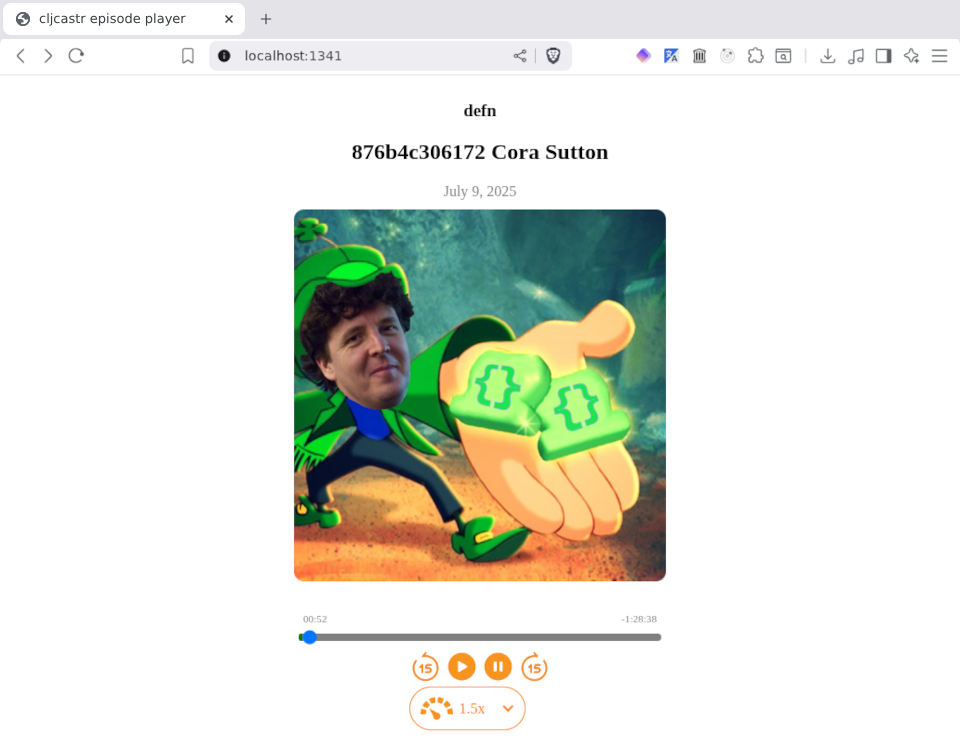
Not only does it look gorgeous, but it actually also works!
Of course, we still haven't gotten around to being able to play more than one hardcoded episode, but that sounds like a job for the next thrilling instalment of Scittlecastr!
You can find all the files for the player we built in this post here:
The preview image for this post was based on the Laughing Arab woman with curly hairstyle using phone and headphones in front of on orange wall photo by Javier Sanchez Mingorance from his Woman In Overall Dress photoshoot. The photo is used under The Noun Project's Royalty-Free Commercial License, and was remixed by hand in the GIMP, which does not allow genAI contributions.
